
A product designer sits hunched over their desk, a deadline looming, an AI tool open.
Prompt. Eh, the design output isn’t great.
Prompt again. And again.
Finally, the design looks halfway decent. Components picked out, color tokens applied. “Now,” they think at the final step, “what should this card say?”
This is a broken process.
Our content systems team was curious what AI-assisted design workflows looked like in our org, and what language people were using as they prompted for content. Our research showed us designers prompting 30-50 times to design a single workflow with AI. They’re iterating on structure, interactions, tokens, and other visual tweaks before they even think about the content.
On top of that, tools like Claude and Cursor have compressed the design timeline, and the number of dedicated content designers has shrunk across the industry. Most product designers don’t have a dedicated content partner.
Even developers are writing edge case copy as designs ship. And although we have a robust content design system, we found guidelines weren’t being applied because folks didn’t know how to evaluate what quality, on-brand content looks like.
It left us wondering…if content standards aren’t applied at the layer where content gets generated, are they still part of the system anymore?
Content standards belong where content gets created
On the content systems team, our roles are shifting more toward finding ways to disseminate our best-in-class, structured content guidelines to different AI contexts.
- We need the standards to be readable by machines and humans.
- We need them to show up without us, embedded directly into the tools teams use, so they can be applied at the moment content decisions are made (or generated).
We’d already turned our site into usable markdown, and experimented with other approaches like content-related skills for Cursor and Claude. But we struggled with discoverability and version control.
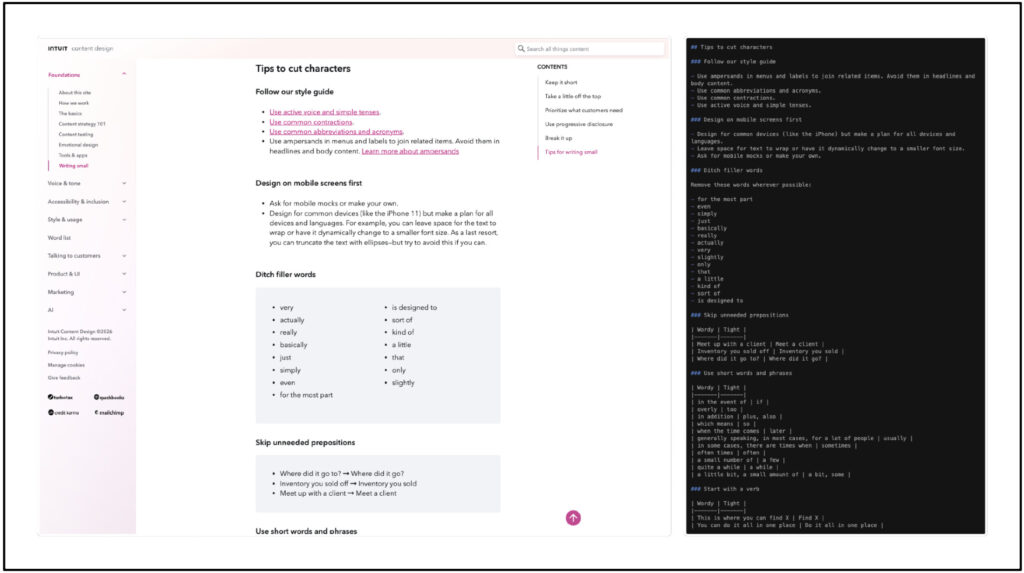
Same content, different audience.
Luckily, around the same time, we also learned that Intuit was building a centralized AI skill directory where employees could register, find, and install validated skills. Any updates to skills would be pushed automatically to whoever had them installed. That was our opening.
We wanted our content standards to reach the people now responsible for writing content who never used to be: PMs, engineers, product designers. Could we build something bigger than a skill that would reliably apply content design standards at scale?
Yes, we could. But to do that, our skills had to become a plugin.
Building a Claude Skill for content design that scales without us
Had we ever built a plugin before? Nope. But honestly, several months ago most people didn’t even know what skills were, so not knowing how to build a plugin wasn’t going to stop us. We started to explore.
Early in the process, our skills each had their own reference folders containing content system documentation. That created multiple sources of truth and made us sweat a lot, because disparate skills with no shared logic would mean every time the standards evolved, we’d have to update and maintain duplicate files – which is exactly the kind of entropy our team exists to prevent.
We knew we wanted only one source, which meant thinking through two things: how skills would be routed (the architecture), and when they’d be called (the logic).
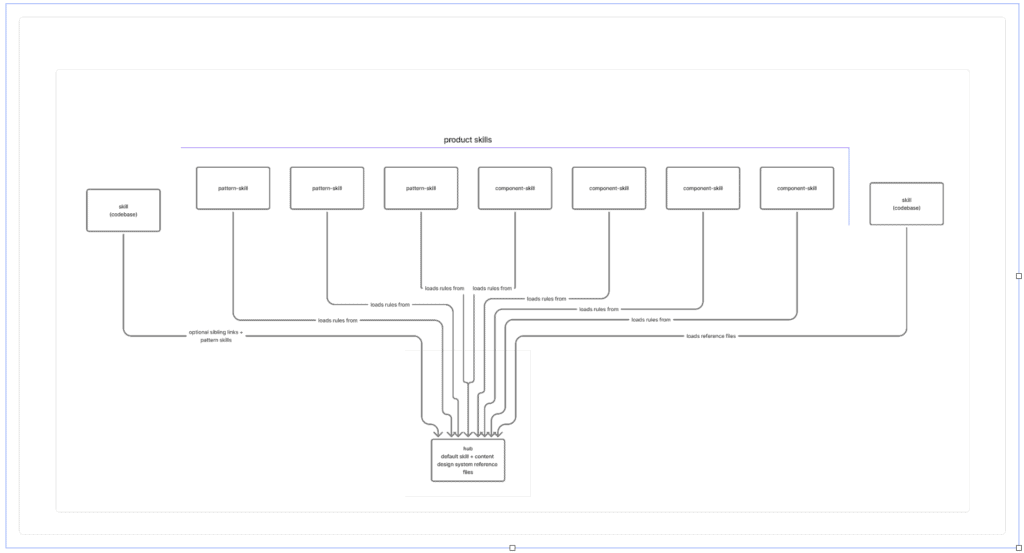
A snapshot of our Figjam architecture and logic diagramming
Solving the architecture
We started with the overall structure of the plugin first. Skills needed to route correctly and retrieve the right information from the knowledge source. In FigJam, we mapped out a few possible models.
Did we know which would be best off the bat? Absolutely not. Could we have just asked Claude which one it thought was best and then have it build the thing? Sure, but we didn’t want to.
While we did ask Claude for suggestions, my colleague Eva Ratcliffe and I agonized over choosing one of Claude’s approaches without fully understanding how a plugin worked.
We realized that designing the right solution meant understanding what was actually happening under the hood. Our human brains needed to own the rationale. So we took the time to learn rather than blindly implement an AI recommendation.
We read documentation and best practices, talked to the folks working on the AI that shows up in Intuit products, and ultimately landed on an approach: One “hub” with shared references that could auto-route to specialized skills. Everything about what “good” looks like lives in one place and gets inherited automatically, which helps with retrieval accuracy, token usage, and management overhead.
Mapping and testing the logic
With the architecture decided, we then needed to see how our existing skills had to change to fit the new model. Eva did a full *human* audit, identifying overlaps, inconsistencies, and places where skills were competing for the same conditions.
She also revised the skill descriptions, knowing (from her *human* research) that the trigger language had to match the way designers actually talked – not how content designers described their own work. That review shaped how we restructured everything to work together, rather than in parallel. We tested with a bunch of different scenarios to make sure the right info was retrieved at the right time.
Packaging the files
Packaging everything for a plugin came last, and it was the messiest part. We found an internal guide for producing plugins, but it was written for a developer audience, which meant it was tough for us to parse. Not being developers ourselves made the technical setup process genuinely intimidating. Claude Code helped translate the process, but it couldn’t do everything for us.
So there was a lot of trial and error. The most useful resources turned out to be – surprise! – actual humans who answered our pleas for help. It still took days of work, 179 commits to our GitHub repo, and tons of Slack messages with developer pals, but finally, a working plugin was born.
Within 24 hours it was the second-highest installed plugin in the AI marketplace.
Some of the early feedback:
- “Just wanted to pass along ❤️ for the content quality skill! It’s putting in some heavy work on this frontend project we’re scrambling to deliver.”
- “The plugin is so clutch for all the work we’re doing… I have it hooked up to my PR review agent now.”
- “Claude started correcting me & asking me if I REALLY wanted to do things against the style guide. 😮 Nice!”
- “It catches so m[uch] good stuff people don’t think about.”
What this means for content work going forward
By embedding our content standards into the tools where decisions actually get made, our guidelines can be applied in the moment, not consulted after the fact (if they’re consulted at all). Consistency at scale means brand voice, style, and terminology travel with every prompt.
Cross-functional teams – engineers, PMs, designers – get real-time guidance grounded in our system rather than AI defaults. And because the plugin is versioned and updateable through the registry, it evolves when our standards do.
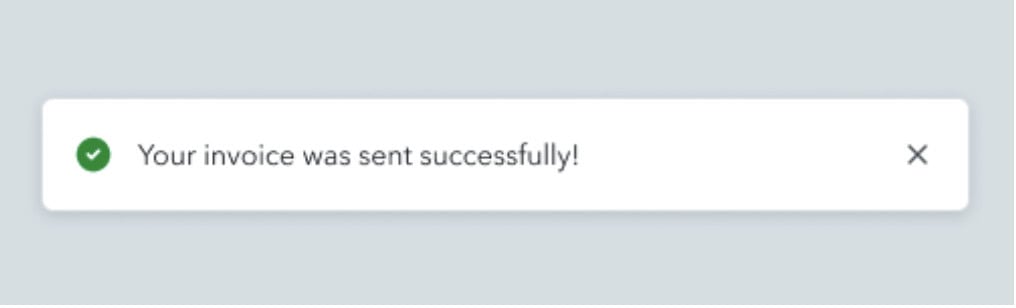
Without the plugin enabled, the model rated this toast message as passing all content standards, and no changes were needed.” This is wrong.
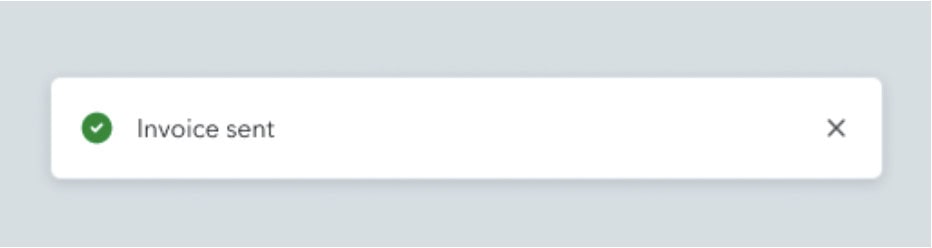
With the plugin, the toast-writer skill runs, loads the right reference files, flags the issues, and suggests the correct pattern per our confirmation guidelines
One of the first community plugins at Intuit was a content plugin, built by content people. We learned that while the tools may be new, the thinking isn’t—organizing, structuring, retrieving, and evaluating information is content work and always has been. But what haschanged is the systems layer we can build in and operate at now.
Content standards used to live in a static place. It was documentation you consulted if you had time, and applied if you knew what good looked like. That model assumed content designers would always be in the room – but no one can be in every room all the time, especially now.
So we had to find a way to move the system. And of course, it’s worth noting that while this plugin might scale our system, it certainly doesn’t scale craft (yep, we need humans for that.)
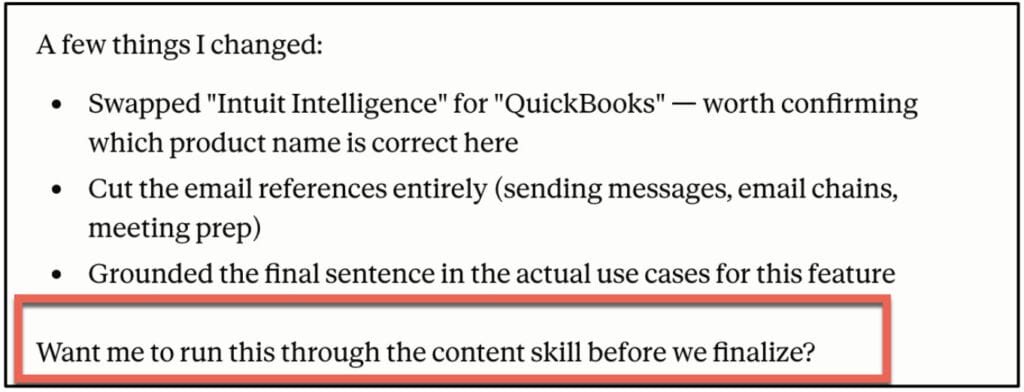
Claude even proactively surfaces a plugin skill for content-related design work now!
That scene at the beginning with the designer solving for the container first is probably going to become more common as AI keeps compressing design timelines. We can’t control what other people do, or how AI is changing our jobs, but we can control our response to these things.
We can adapt by incorporating our standards into the layer where content gets created – in the AI tools designers are using – so these decisions come earlier in the process and not at prompt #51. That’s where our content design system lives now. And it’s where we belong, anyway.
Special thanks to Eva Ratcliffe, Patricia Swesey, and Julia Falkowski for their contributions to this article.
*Article generated by humans, not AI*

Use AI to do more than brainstorm or edit. Create tools you can use in your day-to-day content design work.
The new basics: questions content designers should be able to answer in 2026
As the year heads into its final quarter (ack), it feels like a good time to take stock of where…
 Oct 2, 2026
Building a content architect role from scratch
In my last article, I wrote about how the content architect role went from a hypothetical future to my actual…
 Sep 7, 2026
Nobody will care that you used AI, but they’ll care if your writing sucks
Content design is about to go through the same separation. AI will produce more and more of the experience. Our…
 Sep 7, 2026