
The idea was simple
I had spent months at Coinbase building a content design agent on LibreChat and evangelizing it to stakeholders on Slack and in various team crits. Now some 40+ product designers relied on it daily for content design help. The one downside was they had to upload screenshots and leave Figma to use it, which interrupted their workflow.
The obvious move was to bring the agent inside Figma as a plugin, so it lived right where designers were already working. How hard could it be? I can just build it with Cursor.
The agent was powered by a 30-page system prompt broken up into modules. Each module provided contextual support for different products, services, and use cases across the company. I was inspired by modular coding architecture. While it gave general high-level content support, it could also branch into sub-products that had unique terminology constraints, UXR insights, or legal requirements, and it handled those nuances with remarkable accuracy without needing any special prompt to do so.
The thick wrapper around the agent was the hundreds of pages of content strategy guidelines, voice and tone matrices, frameworks, and taxonomy that brilliant content designers had painstakingly crafted over the years. A lot of it predated LLMs entirely, back when you had to hand-chisel documents word by word. The agent could access all of it through a Glean MCP integration.
It’s time to vibe code
An early lesson in vibe coding came in the form of sleight of hand. I celebrated when, after building a working prototype, Cursor told me the LibreChat agent was successfully connected to Figma. I marveled at my magical prompting abilities. Magic being the operative word, as in fabricated, or in the parlance of LLMs, hallucinated. I didn’t know it at the time.
My innate skepticism got the best of me, and I wondered, “Was the agent really connected to the plugin?” I wrote some evals to test whether what Cursor was telling me was true. It would only answer correctly if it was referencing our content guidelines, the thick wrapper where all the true value lives.
Questions like “How should we abbreviate large numbers?” and “What words should we avoid in X product?” The plugin face-planted like a guy three beers deep sending an unrehearsed backflip at the community pool. It had a lot of confidence, though. I’ll give it that.
On OpenAI’s own SimpleQA benchmark, GPT-5 posted a 47% hallucination rate. Turn on web search and it drops under 10%. But fabrication is endemic to LLMs, so as they say in Russia: trust, but verify.
I was never going to connect the LibreChat agent to Figma no matter how much Cursor told me otherwise. An engineer on my team explained why. I had been treating the LibreChat agent like a software program, and it wasn’t one. It was just a container, a prepackaged configuration I had set up: my 30-page system prompt, which MCPs to use (Glean), and which model to use (Opus 4.7). There was no way to bring that container into Figma. My party balloon was unceremoniously deflated. I had a feeling it wouldn’t be the last time.
Turning my skills into SKILLs
Unwilling to give up, I created a set of SKILL.md files that could mirror the LibreChat agent’s performance. A system.md file held the core instructions for how the agent should behave and when to call the 17 skill files beneath it, using the same modular architecture that made the original so effective.
Then I connected Claude Opus 4.7 to the plugin and ran the same evals from before, checking whether the skill files were actually being referenced. This time it passed. The plugin could check strings in Figma against the skills library and return recommendations. Things were finally starting to click.
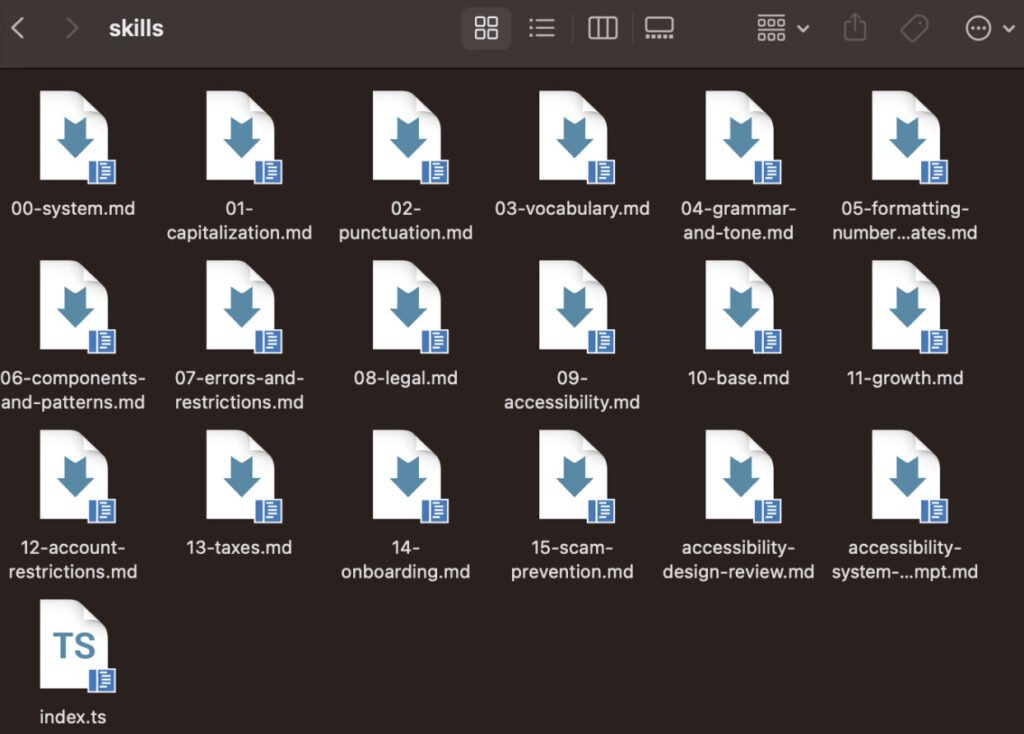
Example of skills library
The plugin was checking strings one at a time
But I was still running into a bigger problem. The plugin was checking each string against the guidelines on its own. It looked at the headline, then the body, then the CTAs, and graded each one independently. Of course, tech products aren’t a set of independent strings. The content all must work together across components and an entire flow to guide the user.
Here’s what the plugin might have recommended for an exit modal before I fixed this:
- Headline: Leave without saving?
Body: To keep your account active, you’ll need to upload a photo of your passport or driver’s license. - Primary CTA: Continue
- Secondary CTA: Cancel
Read those lines one at a time and each is fine. Read them as a screen and it stops making sense. The headline asks about saving progress, the body jumps to identity verification, and Continue and Cancel don’t line up with the question the headline just asked. Every string “passes” and the screen is a confusing mess.
Why couldn’t the plugin catch that? As a content designer I’d spent my career doing this part automatically, reading the whole screen or flow in the context of the user journey and checking whether it holds together. But just because something is fundamental and obvious to me doesn’t mean an LLM will pick up on it.
I rewrote the system prompt to treat the frame as one experience instead of a stack of separate elements. After that it started recommending content like this:
- Headline: Save before you go?
- Body: You can pick up right where you left off.
- Primary CTA: Save
- Secondary CTA: Leave without saving
Much better. The headline asks a question and the rest of the screen provides the contextual guidance a user would need to make an informed decision. Grading a single string against a rule was only half the battle. The most important part was getting all of the strings working together.
Two steps forward, one step back
I won’t sugarcoat it, vibe coding in Cursor is a relentless game of Whac-A-Mole. Adding something basic like a copy/paste button would often break the whole thing. Pasting error messages from the Figma console into Claude, typing commands in the terminal, fixing it, starting again. It’s all part of the process.
The single biggest reduction in whacks came from a small change. I used Claude to write the Cursor prompts for me. Claude structured them in a machine-readable format and, more importantly, spelled out what Cursor should NOT do. When fixing this UI element, don’t touch that part of the codebase, because it’ll break something else. I recommend this over prompting Cursor yourself.
The plugin got to a decent state. You could select a frame or frames, write a prompt or tap a preconfigured button like “Make it conversational” or “Make it shorter,” and it would check the content against the skill files, run it through Opus 4.7, and return recommendations. A designer could click “Apply suggestion” and Figma updated the revised content automatically.
How to vibe code with collaborators
While I was demoing the plugin to our accessibility lead, Sam Smith (aka the GOAT), he floated a bigger idea. Why not make this a one-stop shop for content design, accessibility, and design system guidance? I loved it. We teamed up, and the scope of the project got a lot bigger.
The first wrinkle was working on it at the same time. Figma makes collaboration trivial. Cursor does not. We started by passing build files back and forth through a shared Google Drive folder, which was slow and meant we couldn’t really work in parallel.
So we moved to GitHub, connected it to Cursor through the GitHub Desktop app, and started cloning the repo, branching, and merging to main. It took some getting used to, and Sam was a huge help through all of it.
Here’s Sam in his own words:
“Vibe coding is an incredible multiplier, but your code is only as accessible as the instructions you give your AI. If you want to build things that actually work for everyone, you have to prompt with accessibility in mind, give your agents proper context, and then ask them to audit their own output. Most importantly, don’t skip the manual check. Use a keyboard to tab through your interface, and fire up a screen reader. The vibes mean nothing if real people can’t use what you built.”
An engineer joins our project and things get real
At an offsite in San Francisco, one of the software engineers on our team offered to look at the codebase and squash some nagging bugs.
The first thing he asked for was the latest build file. No problem. He looked it over for about five minutes and asked, “Where’s the source folder?”
“I’m sorry, the what folder?”
“The source folder. I need it to properly evaluate the code.”
“Um, this is what Cursor gave me. I’m not sure? I asked Cursor to give me everything I’d need to hand it to an engineer.” I had really asked Cursor this.
“But there’s no source folder. I can’t see any of the code. I don’t know what’s going on here.” His expression never changed, while internally I was hitting the panic button.
“Right, uh, let me get back to you on that.”
A source folder, for the uninitiated, is where engineers can actually see and make sense of the codebase. It’s the blueprint that holds the logic, functions, and rules they need to understand the moving parts under the hood. Somewhere along the way Cursor had decided we didn’t need one. What it gave me instead was a dist/ui.html file, a minified and compressed version of the code that no human can read.
Figma technically only requires the dist output and manifest.json to run a plugin, so Cursor must have judged the source folder non-essential and sent it to the digital dustbin.
No human engineer on Earth would ever do this, because it destroys your ability to read, maintain, or debug the code later. Of course, Cursor is not an engineer on Earth. It is an LLM making probabilistic guesses. Shake the Magic 8-Ball enough times and it might produce the Mona Lisa of code, or it might delete your source directory. Whoops!
Watching him work made something obvious that I had been circling the entire project. He rebuilt the codebase from the ground up using best practices, fixed bugs that had plagued us for weeks in a single afternoon, and stripped out the redundant files Cursor had left behind. He knew what mattered, what to keep, and what not to delete. Things I had no clue about.
I realized he was closing the same gap I had run into with the exit modal, just on the engineering side. Being an engineer is about a lot more than writing code, much like being a content designer is about more than writing strings. It’s the governance, the content strategy, the information architecture, and the quality of the decisions underneath the words.
That’s what separates a content designer from someone who writes strings without asking why they’re there. LLMs can produce a limitless amount of words. But the decisions about style, taste, quality, consistency, accuracy, reading comprehension, and reproducibility at scale come down to qualified humans.
As an industry, it seems we’ll need to beat this drum for a while until it becomes common knowledge. I see a lot of posts on LinkedIn making this same point. And that is a good thing.
Where did we end up?
The plugin was ready to share, so we handed it to a handful of product designers for feedback. The response was clear: they loved that it all lived in Figma. They felt the LibreChat agent still gave higher-quality recommendations overall, and closing that gap would mean writing a lot more content design guidance and tightening the codebase. Without a dedicated engineer on the project, that would prove difficult.
We came away with a validated direction and a clear sense of what the next version needs. We proved we could vibe code a viable MVP that designers actually wanted to use, even if it still needed a lot of work. And we knew exactly where to take it next.
How I’m thinking about content design these days
Content designers are being asked to spend a lot of their time building systems that LLMs, chatbots, and agentic workflows pipe into their distribution channels. Working this way feels like content governance with a jet engine strapped to the back. Keeping an LLM from flying off the rails is becoming part of the job, and there’s no single approach that works.
It requires continuous learning, iterating, and testing, especially given how fast new products, tools, and integrations keep popping up.
Again, taste and judgment are still the defining factors. Someone has to look at the output and say this one is good, this approach is working. Or say this one is bad, then diagnose why it happened and how to fix it.
Otherwise you risk your content spiraling into the generic AI writing so often criticized as slop: negative parallelisms, cliches, and filler that adds no substance.
It’s an exciting time if you like learning and nerding out, which is how I ended up in tech in the first place. And even though the inputs are changing, the goal hasn’t. I’m still trying to ship content that drives measurable business outcomes and helps customers get things done.

Use AI to do more than brainstorm or edit. Create tools you can use in your day-to-day content design work.
The new basics: questions content designers should be able to answer in 2026
As the year heads into its final quarter (ack), it feels like a good time to take stock of where…
 Oct 2, 2026
Building a content architect role from scratch
In my last article, I wrote about how the content architect role went from a hypothetical future to my actual…
 Sep 7, 2026
Nobody will care that you used AI, but they’ll care if your writing sucks
Content design is about to go through the same separation. AI will produce more and more of the experience. Our…
 Sep 7, 2026