

The job of a content designer is to guide users through an experience using the right information at the right time. That’s it. Everything else you learn should be in support of that goal.
But “everything else” can cover a wide variety of skills to make that job easier, like using Figma, or increasingly AI tools, or learning how to conduct research, etc.
Technical content design skills are included in that category. They’re becoming increasingly important: as AI tools reduce the gap between content designers and the ability to edit a codebase, there’s less of a barrier for you to actually make changes yourself instead of relying on a developer.
It was the same with Figma. Being able to edit design files collaboratively was a huge win for UX writing and content design. Yes, it required learning some software. But it also opened up new avenues for collaboration — and technical skills are the same.
We want to be clear: you shouldn’t learn technical content design skills for the sake of learning them. There should always be a “why?” you ask yourself when learning a new skill, and that “why” should be about delivering the right content, to the right user, at the right time.
But we think these technical content design skills can help with that goal.
1. Know where your strings live
Every piece of text in a product is stored somewhere. For many designers that place may be a design file, but their real home is in the code.
Strings might be in localization files, managed through a platform like Phrase or Lokalise. They might be hardcoded directly into a component, they might live in a JSON file, or they may be returned by an API. They might live in a CMS.
Many products use a combination of these methods. A checkout flow might pull button labels from a localization file, error messages from an API, marketing copy from a CMS, and have a legal disclaimer hardcoded into a component that nobody’s touched in two years.
Understanding where these all live is the first step in understanding how to change them without relying on others. It’s also the first step to understanding architecture: eventually you might want to suggest moving strings to key-value pairs in JSON files to get more control, but you can’t make that suggestion if you first don’t understand where things live.
2. Read structured data formats
Content in products is often stored in structured formats. JSON is the most common, though you might come across YAML and some others as well. None of these are programming languages, they’re just ways of organizing data. A JSON file might look like this:
{
  "checkout": {
    "button": {
      "submit": "Complete purchase",
      "back": "Return to cart"
    }
  }
}
Keys on the left, values on the right. Nesting shows hierarchy. If you can read a spreadsheet, you can read JSON. This type of format makes it easy to change strings at scale, but it also requires a large amount of setup.
Understanding structured data can also help when requesting information from Large Language Models. If you can structure data in the right way for your application, it opens a lot of doors for new features or working quickly.
3. Navigate a codebase
A codebase is a folder full of files that lives in a repository, usually on GitHub. It’s organized in a way that makes sense to the team that built it, which means it might not immediately make sense to you.
You don’t need to understand every file. You need to know how to find the ones that matter: localization files, component files, documentation, that sort of thing. You need to be able to search for a string and find where it lives.
If you’re able to navigate a codebase on your own and locate where those strings live, you’ll also be able to suggest and make changes on your own – and you’ll be able to read the history of why certain strings have changed as well.
Picture this: A customer complains that an error message is confusing. You search the repository for the exact text, find it in a localization file, and check the commit history. Turns out the message was changed three months ago and the commit message says “Update error messages” with no further context, but the linked pull request has a comment from a product manager explaining why the wording changed. In five minutes, you’ve got the full story without asking anyone.
4. Understand how changes ship
When a change is merged into the main branch of a codebase, it doesn’t reach users immediately. It goes through a pipeline: the code is built, tested, deployed to a staging environment, then deployed to production. That process might take hours or days depending on the team’s release schedule.
If you don’t know the deployment schedule, you find out the hard way: your changes miss the window and the campaign launches with placeholder content. If you do know it, you plan backwards and everything ships on time.
5. Read strings in code
Many strings are written directly into the code, hardcoded into components by engineers. You need to be able to open a component file and spot the text. Hardcoded strings sit between tags as plain text. Localized strings are often wrapped in a function call like t('checkout.button.submit') that pulls a value from a separate file.
Here’s a tip: head over to GitHub, pick a trending repo, then have a look around inside and see if you locate the different strings.
6. Make changes through GitHub
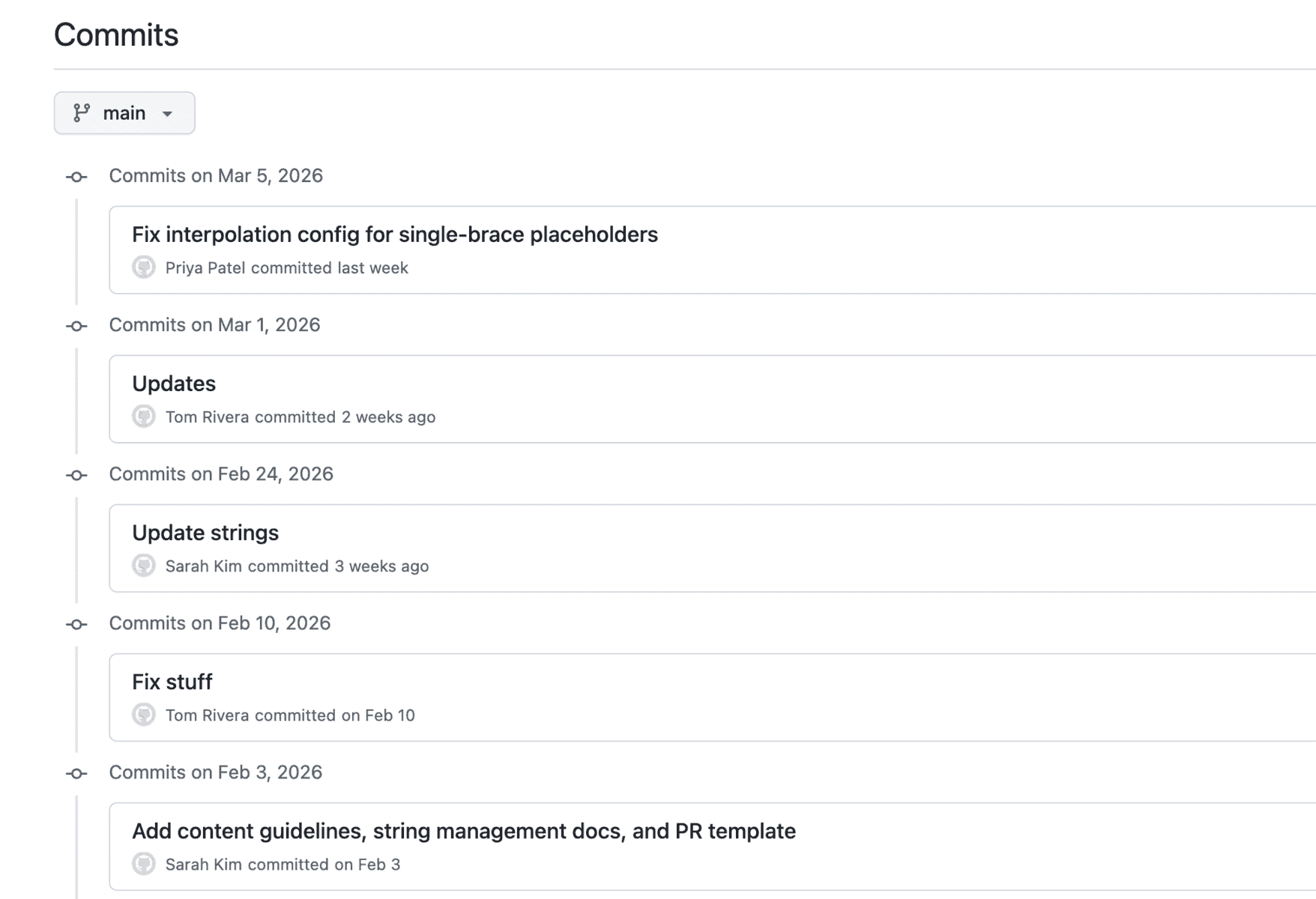
GitHub’s web interface lets you create a branch, edit a file, write a commit message explaining what you changed, and open a pull request for review.
For content changes – updating a string, fixing a typo, standardizing terminology across a localization file – this is completely within your reach. You find the right file, change the right value, and write a clear description of what you changed and why.
This allows content designers to have greater control and responsibility over content. It’s the type of influence we all want.
7. Use the terminal to audit content at scale
Clicking through files one by one works when you’re looking at a single screen. It doesn’t work when you need to audit an entire product.
The terminal lets you search hundreds of files in seconds. Let’s say you’re conducting an audit: one command can find every string containing the word “error.” Another can count how many times a specific term appears, and another can extract every string over a certain character count into a document for review.
Maybe you suspect the product has inconsistent terminology, but you need data. You run two commands:
grep -r "Sign in" content/en/ | wc -l
grep -r "Log in" content/en/ | wc -l
The results: 23 and 8. That’s 31 strings referring to the same action with two different terms. You now have specific numbers, and you know exactly which files each one appears in.
8. Use AI for technical work
One of the great uses of AI for content design work is that it flattens the distance between you and the codebase. You don’t need to understand the system to fully describe what you need.
You want to find every string key that exists in your English localization file but is missing from the German file. The terminal command to do that comparison is more complex than anything you’ve written yourself. So you ask AI: “Find every key in content/en/notifications.json that doesn’t exist in content/de/notifications.json.”
AI produces a command, you run it, and it returns a list of 12 missing keys. You can evaluate whether that result is correct because you understand what localization files are, what matching keys should look like, and what it means when a key is missing.
This is why it’s good have both a bases in technical understanding and the ability to AI. Combining both gives you the ability to conduct the task, then verify it.
Start with technical content design skills you need most
You don’t need all eight of these technical content design skills immediately, and you may not even need all of them. Start with the ones closest to problems you’re already experiencing.
If you keep asking engineers where strings live, start with reading the code. If your terminology is inconsistent and you need data to make the case, start with the terminal. If you’re tired of handing off content and hoping it ships correctly, get into your repo (if you can).
The goal is straightforward: deliver the right content, to the right user, at the right time. These skills just give you more ways to make that happen.

A self-paced course for content designers who want to read and manage strings in code, navigate GitHub, use the terminal, and work with developers.

The new basics: questions content designers should be able to answer in 2026
As the year heads into its final quarter (ack), it feels like a good time to take stock of where…
 Oct 2, 2026

Building a content architect role from scratch
In my last article, I wrote about how the content architect role went from a hypothetical future to my actual…
 Sep 7, 2026
Nobody will care that you used AI, but they’ll care if your writing sucks
Content design is about to go through the same separation. AI will produce more and more of the experience. Our…
 Sep 7, 2026