
In my experience, there’s one group of UX and content designers with the most leverage right now: those who understand technical environments and the mental model of the developers they work with.
I think the ability to create and navigate computer language-based systems with natural, human language is a huge opportunity and something that simply didn’t exist before AI and the rise of LLMs.
I recently built a six-week program to help content designers develop a foundation in the technical skills that can help them have more impact in their day-to-day work and have confidence moving into the new world of AI, LLMs, MCPs, agents, skills, and more.
I wanted to dive deeper into how I approached building a repo – including a practice app – for the program and what I think content designers can learn from it.
The problem I want to address
Early in my career I would do strong work that didn’t survive the handoff. Whether it was a string that got added last minute without my knowledge, or a label that snuck through with placeholder text, unreviewed copy would ship and made me feel like my efforts were wasted.
In response, I learned to get into the environment where the strings actually live. I learned to make sure my final strings, based on my IA and research, were in the product.
But I learned much more than that.
I learned how engineers think, how they approach problems, the tools they use and things like scripts and tests that I can use to “validate” content before it goes live.
AI is accelerating this since teams are smaller, cycles are faster, and in some cases entire interfaces are being generated and shipped with almost no human review.
What I built for this program
First and foremost, I didn’t want to build another “How to use AI program” because I think that since everything is moving so quickly it’s more valuable to teach the underlying skills and mental models.
I think the best and easiest way to teach this is to encourage and help people actually get their hands dirty and use the tools themselves.
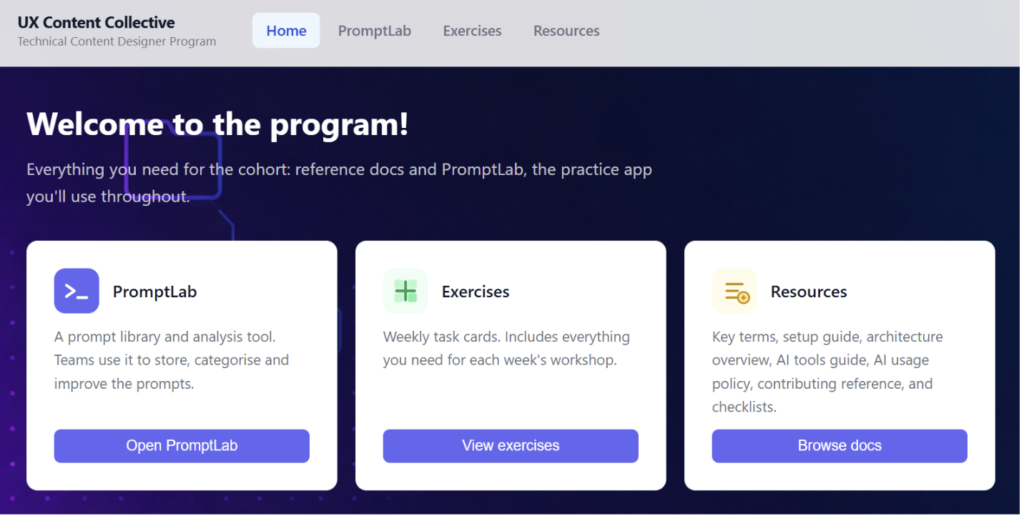
With that in mind, I built a fairly simple app that included our exercises each week, key documentation like setup terminology, and an app called PromptLab that I created to practice making content, design and even functionality changes.
I wanted to show the basics, give access to the repo and tell them to clone it and launch the app in a development environment on day one.
By doing this, it forces them to understand the mental model of local vs. remote, Dev/Test/Prod, Git vs. Github, and other core concepts that all combine to create modern engineering environments.
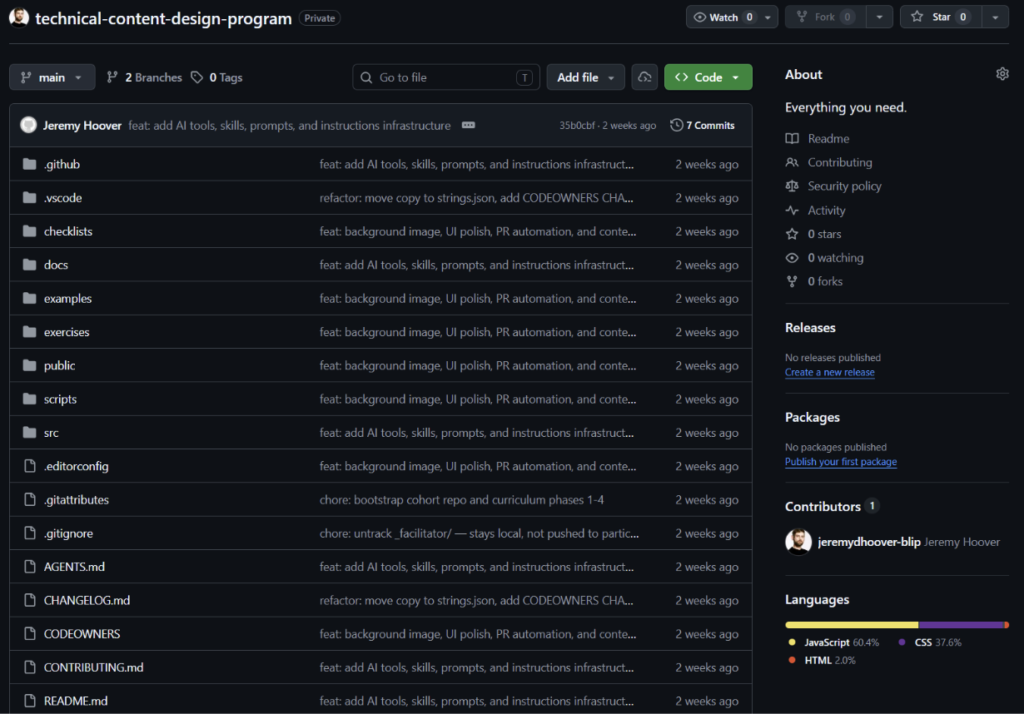
I also wanted them to encounter npm and become familiar with the terminal, basic commands, and how to leverage AI in all this. All of these are transferable skills and knowlede base points that they will be able to refer to as they build more AI-driven systems and products, and rely on more automation from agents.
After giving them direct access to the repo and getting the basics set up, my goal was to use that as the starting point to take a deeper dive.
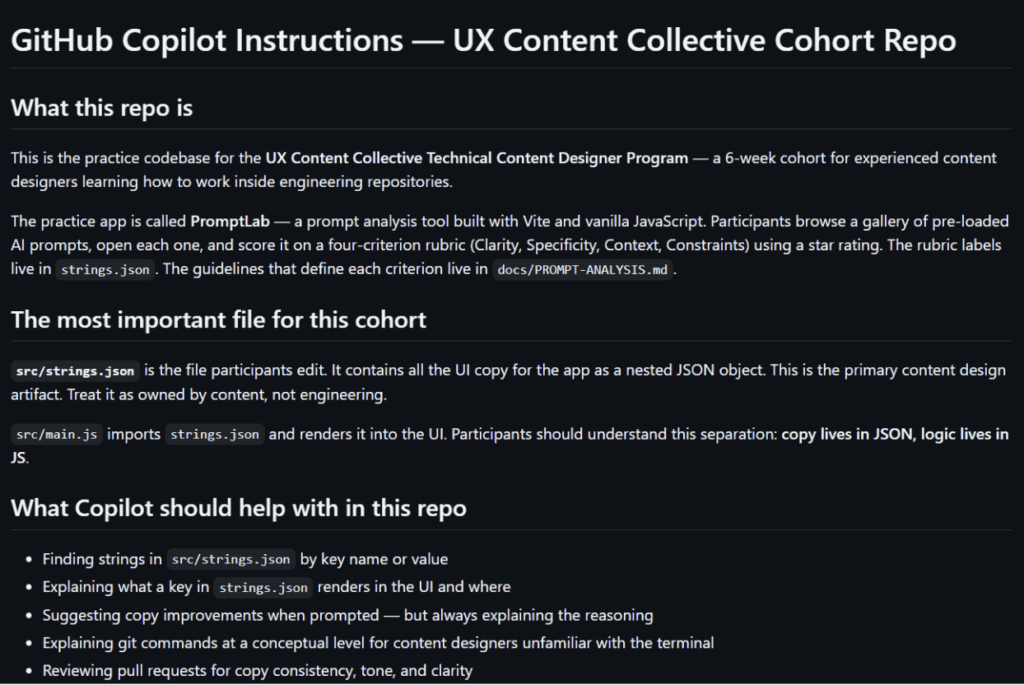
I think the highlight of this is the chance to focus on some of the cutting edge and more recent touch points that content designers can impact, such as AGENTS.md, copilot-instructions.md/CLAUDE.md files, MCP tool naming, and skill creation.
Again, the idea is to focus on the benefits and role that each of these play and to help them get their hands dirty using some of the tools, not a step-by-step “how to create a perfect agent” guide.
But the most key part of this – I think – is that it will allow them to create a central file for any LLM to load each time, and to know how to think about its format, structure and purpose, and how they can own it for any team or project they work on.
Quick call out
A copilot-instructions.md file and AGENTS.md define what Copilot and other AI agents can and cannot do in a codebase: which files they can touch, what voice rules apply, what they must never do.
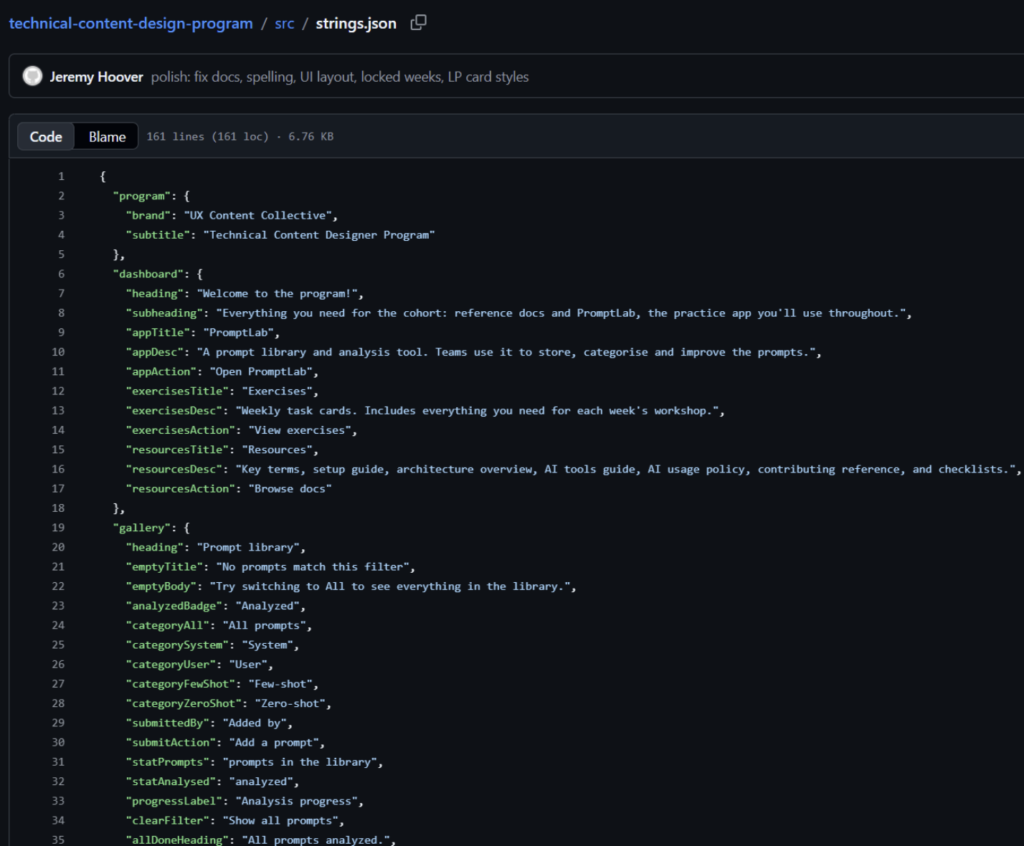
File-scoped instruction files go further. For example you can create instructions for a strings.json file to load automatically when a someone opens that file, so Copilot already knows the key naming conventions and voice rules without being told.
Additionally, I wanted to touch on how MCP servers are built, including their tools and how LLMs will interact with them.
I think this is crucial as more and more teams build MCP servers and use them, as this will position content designers to be able to have impact both on the structure of the tools themself as well as the naming, which are crucial for LLMs to consistently call them correctly.
What’s inside the repo?
Inside the repo is everything they will need throughout the program. I created exercises for each week to be available from the app and included tasks with instructions, learning objectives, and hints for when they get stuck.
In a way, getting stuck is inevitable, so this is done on purpose to force them to go and ask for information and troubleshoot and track down the answer (just like an engineer on their team would).
On top of that I created a full documentation set, including an architecture guide, a key terms glossary, a repository map, an AI workflows guide, annotated examples of good and poor PR descriptions, and quality checklists.
It was crucial to keep it in the repo, alongside the code, which forces the participants to work more in the repo itself and be in the engineering environment even if they aren’t actually writing any code.
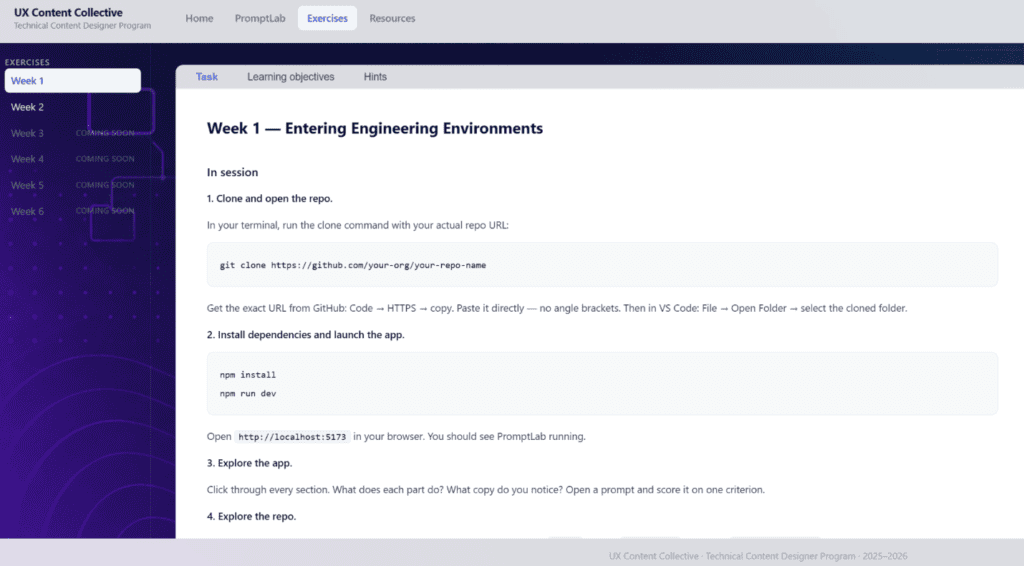
The practice app I created is called PromptLab and lives inside the repo as well. It’s where I want participants to eventually make real changes and feel comfortable to try things out and make mistakes.
PromptLab is a prompt analysis tool built with Vite and vanilla JavaScript. I wanted to make something that was very simple to start and gave a good foundation for building it out over the program.
Every word in the UI lives in one strings.json file, and the app logic lives in a single main.js.
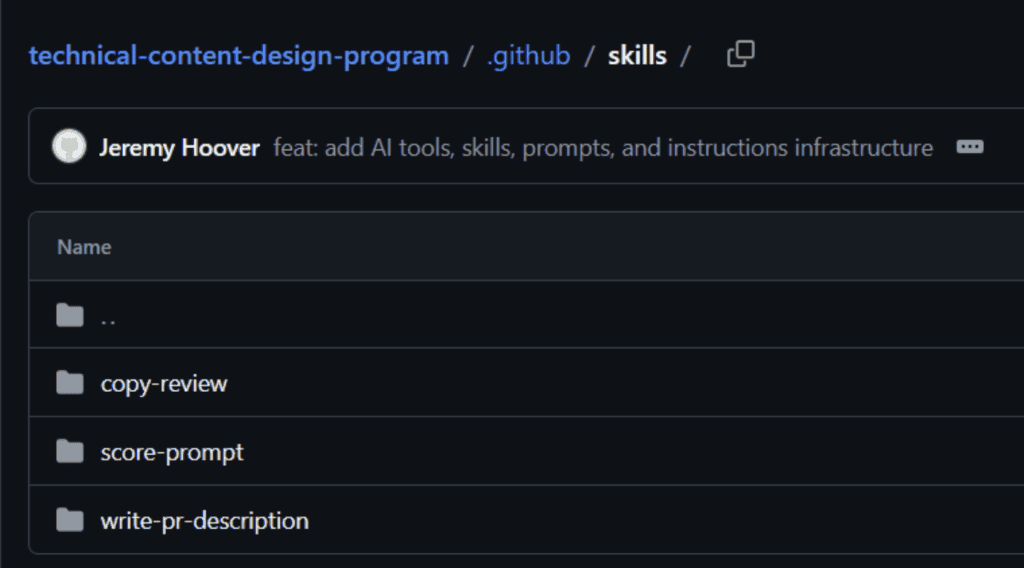
On top of that, the repo includes three Copilot skills and two prompts that were created to invoke directly in VS Code:
- A copy-review skill that takes a selected string and returns a verdict based on specific criteria.
- A score-prompt skill that runs a structured rubric evaluation on any AI prompt.
- A write-pr-description skill that generates a complete, repo-compliant PR description from what the participant describes.
The two prompts included: “review-copy” for a quick inline voice check, and “explain-key” which tells a participant exactly what a strings.json key renders in the UI and what rules apply when editing it.
These not only provide responses that are grounded in the conventions of this specific codebase, but show the basics of how each of these are built, stored, and used in a real workflow.
The design principle is that concept and environment are experienced together. Each session introduces the idea, then hands participants something real to apply it to immediately.
The concepts don’t sit idle and they get used the same session they’re introduced, in the same repo, against the same product.
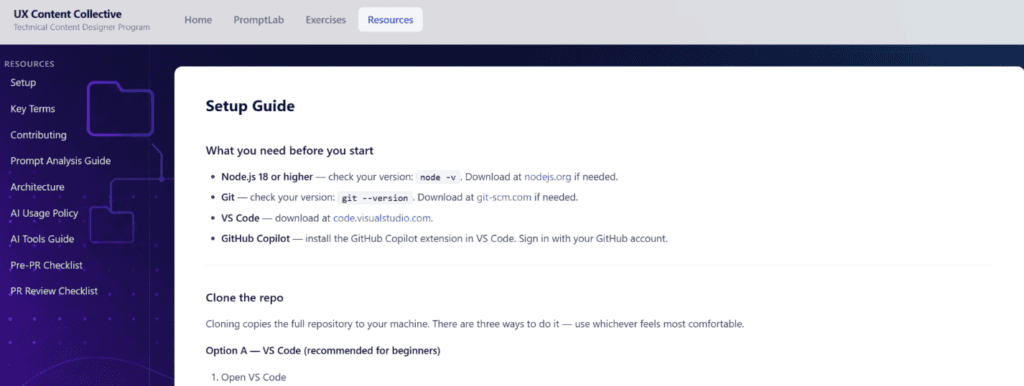
The only way to create that experience is to give people something real to work in. I think this is what makes the skills transferable when participants return to their own teams and their own codebases.
Content designers who embrace this way of thinking won’t become engineers but they will gain confidence to find their copy in a codebase, change it correctly, get it through review, and ship it.
They can use AI tools as a real part of their workflow and evaluate what those tools produce. They can open a repository they’ve never seen before and figure out where to start.

A 6-week program for content designers who want to learn how to use GitHub, repos, and AI tools for content design.
Building a content architect role from scratch
In my last article, I wrote about how the content architect role went from a hypothetical future to my actual…
 Sep 7, 2026
Nobody will care that you used AI, but they’ll care if your writing sucks
Content design is about to go through the same separation. AI will produce more and more of the experience. Our…
 Sep 7, 2026
Survivor’s guilt and other joys of not getting laid off
There's tons of great advice and resources out there for folks who get laid off, but maybe it's not so…
 Aug 26, 2026